
iPhone
Open app.bnbcleaning.co.nz in Safari, tap Share, then Add to Home Screen. Push notifications on iPhone need this, and iOS 16.4 or later.
One shared place for the cleaning side of your short-term rental. Here's how it goes for owners and for cleaners.
Go to app.bnbcleaning.co.nz, enter your email address and the code we send you. There's no password to remember.
Address and access instructions, usual checkout and check-in times, beds and linen, laundry, bins and your cleaning checklist. Set it once; every new job starts from it.
In Airbnb, copy your listing's calendar export link and paste it into BnBCleaning. Checkouts become proposed cleans for you to confirm. The link only shares dates: it can't see your guests or change anything in Airbnb.
Send an invitation by email. Add a backup cleaner too, if you have one.
Propose a rate per clean, or let your cleaner propose one. A price only changes when the other side approves it.
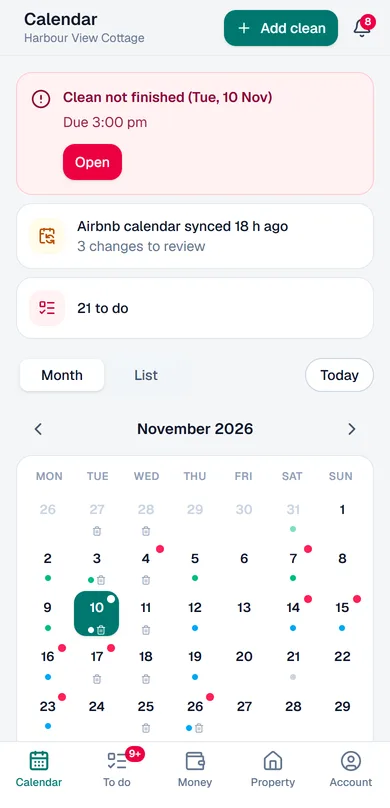
See each clean's checklist, photos, video and notes. Get an alert if a clean hasn't started or finished on time, or if your cleaner reports something urgent.
Sign in with the email address your owner invited, using the code we send you.
New cleans arrive as offers. Accept or decline each one, or accept several at once. Mark the days you're unavailable.
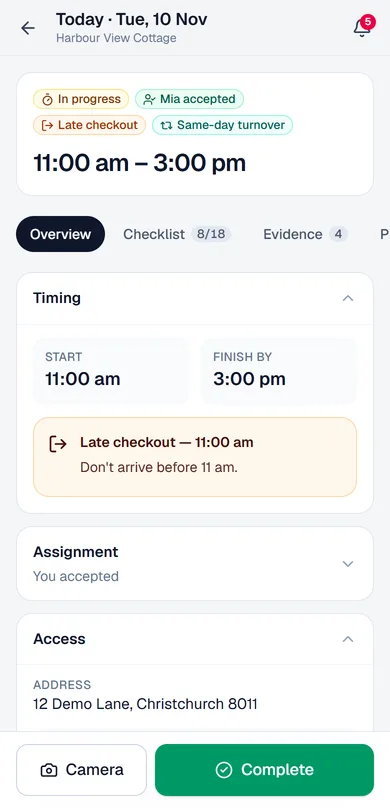
A reminder the evening before and on the morning of each clean, with the times and access details.
Open the job, take before photos in the app, work through the checklist, take after photos, then mark it complete.
Choose weekly or monthly invoicing. Draft invoices are built from your completed cleans at agreed prices; check them and issue them. When the owner records a payment, you confirm it's arrived.
BnBCleaning is a web app: no app store, no download. Add it to your home screen and it opens like any other app.
Open app.bnbcleaning.co.nz in Safari, tap Share, then Add to Home Screen. Push notifications on iPhone need this, and iOS 16.4 or later.
Open app.bnbcleaning.co.nz in Chrome, open the menu and tap Install app (or Add to Home screen).
Set up your property, invite your cleaner and let the reminders, checklists and invoices take care of themselves.
Questions? support@bnbcleaning.co.nz